What happens after you request an exam accommodation?

It looks simple on the surface. But behind it, multiple teams review, decide, and make sure everything is in place before your test.

This project focuses on designing that invisible system.

This project focuses on designing that invisible system.

ROLE: I focused on shaping the end to end flow, working through how approvals should function, and aligning with teams to make the experience smooth.

TIMELINE: 8 weeks · July to August 2025

TEAM: Senior Product Manager, Accommodation Review Team, Scheduling Team, Clients
And me — driving the design end to end

What happens after someone requests an exam accommodation? 🤔

It sounds simple — select what you need and move on. But behind that request, multiple teams review documentation, make decisions, and coordinate approvals before a candidate can even schedule their exam.

At Pearson, this process was spread across emails and spreadsheets — slow, fragmented, and hard to track.

Quick TL;DR of the case study

Why Choose Icon

The Problem

Everything ran on emails + spreadsheets → delays, duplicate work, no visibility

Why Choose Icon

What I did

Designed a centralized system that brings all teams into one unified flow, adapts based on roles and approvals, and efficiently handles both simple and complex requests.

Why Choose Icon

Key idea

Instead of building multiple flows, I designed one system that changes based on who’s using it.

CTA BG

What changed is that teams no longer chase emails, requests now move in real time, and nothing gets lost between handoffs.

+40% ✅

faster approvals

+30%📆

quicker scheduling

−45%⚠️

manual errors

CTA BG

What changed is that teams no longer chase emails, requests now move in real time, and nothing gets lost between handoffs.

+40%

faster approvals

+30%

quicker scheduling

−45%

manual errors

CTA BG

What changed is that teams no longer chase emails, requests now move in real time, and nothing gets lost between handoffs.

+40%

faster approvals

+30%

quicker scheduling

−45%

manual errors

Now, let’s get into the details

#1 Overview

The goal was to digitize how accommodation requests like extra time, assistive tools, or special setups are reviewed and approved before scheduling.

About Image
About Image

Previously, this process relied on:

Previously, this process relied on:

→ email chains

→ email chains

→ shared spreadsheets

→ shared spreadsheets

→ manual updates across teams

→ manual updates across teams

This led to delays, inconsistent data, and poor visibility. I worked on turning this into a centralized system that reduces delays and keeps everyone aligned.

#2 The Problem

Accommodation approvals weren’t just slow, they were unpredictable.

Why Choose Icon

Requests moved across teams through emails and spreadsheets

Requests moved across teams through emails and spreadsheets

Why Choose Icon

Each team worked on its own version of data

Each team worked on its own version of data

Why Choose Icon

There was no real time visibility

There was no real time visibility

Why Choose Icon

Scheduling teams had to wait for manual confirmation

Scheduling teams had to wait for manual confirmation

As a result, candidates faced delays in booking exams, and teams spent more time coordinating than reviewing.

This wasn’t a single flow.

#3 The Challenge

Each team needed different levels of access and control. The challenge was to design a system that could handle all these variations without becoming messy or inconsistent.

Each team needed different levels of access and control. The challenge was to design a system that could handle all these variations without becoming messy or inconsistent.

The process changed based on:

🤔

Who created the request?

Who had approval authority?

Whether the request was standard or non-standard.

#4 Understanding the Existing System

Before designing anything, I mapped how the current process actually worked. A typical request looked like this:

#1

Candidate submits request through RARS (the system candidates use to submit their requests)

Candidate submits request through RARS (the system candidates use to submit their requests)

#2

The review team exports the relevant data into an Excel spreadsheet for evaluation.

The review team exports the relevant data into an Excel spreadsheet for evaluation.

#3

The spreadsheet is then shared with other teams via email for further action.

The spreadsheet is then shared with other teams via email for further action.

#4

Each team updates and maintains its own version of the spreadsheet independently.

Each team updates and maintains its own version of the spreadsheet independently.

#5

The candidate is notified manually once the process or review has been completed.

The candidate is notified manually once the process or review has been completed.

Consequently, teams faced:

Why Choose Icon

Processing Delays

This ultimately led to delays of approximately 3–4 days for each individual request, slowing down overall turnaround time.

Why Choose Icon

Data Duplication

It also resulted in duplicate data entries and frequent version conflicts across teams, creating confusion and unnecessary rework.

Why Choose Icon

Lack of Visibility

There was no clear visibility into scheduling, making coordination across teams difficult and often inconsistent.

The system wasn’t just inefficient — it lacked a shared source of truth.

#4 Research & Discovery

I conducted contextual inquiry sessions with 12 reviewers and schedulers. What I kept hearing:

Amy | Head of Review Team

We spend more time fixing incomplete data than reviewing.

Candidates keep asking for status updates.

Larissa | One of our client

Eden | Head of Scheduling Team

We don’t know what’s finalized without checking emails.

CTA BG

🤔

What this told me, the issue wasn’t just speed — it was clarity.

What this told me, the issue wasn’t just speed — it was clarity.

🔢

Reviewers needed clean, complete inputs

👩🏻‍💻

Scheduling teams needed real-time visibility

👀

Clients needed control without breaking the flow

👥

There was no shared system everyone could rely on

The real problem was the absence of a single, consistent workflow across teams.

The real problem was the absence of a single, consistent workflow across teams.

CTA BG

🤔

What this told me, the issue wasn’t just speed — it was clarity.

🔢

Reviewers needed clean, complete inputs

👩🏻‍💻

Scheduling teams needed real-time visibility

👀

Clients needed control without breaking the flow

👥

There was no shared system everyone could rely on

The real problem was the absence of a single, consistent workflow across teams.

Mapping Workflow Complexity

#5 Userflow

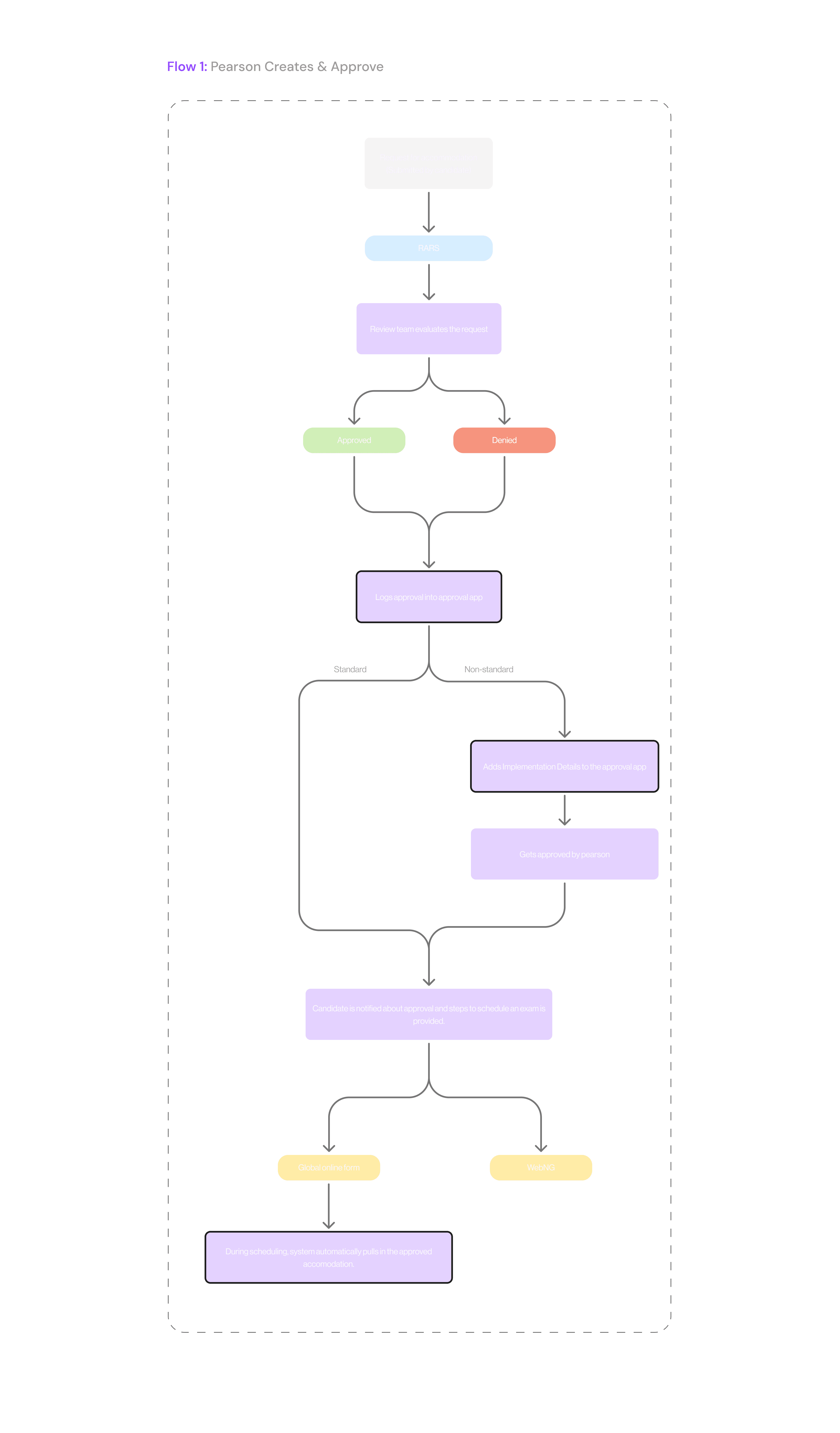
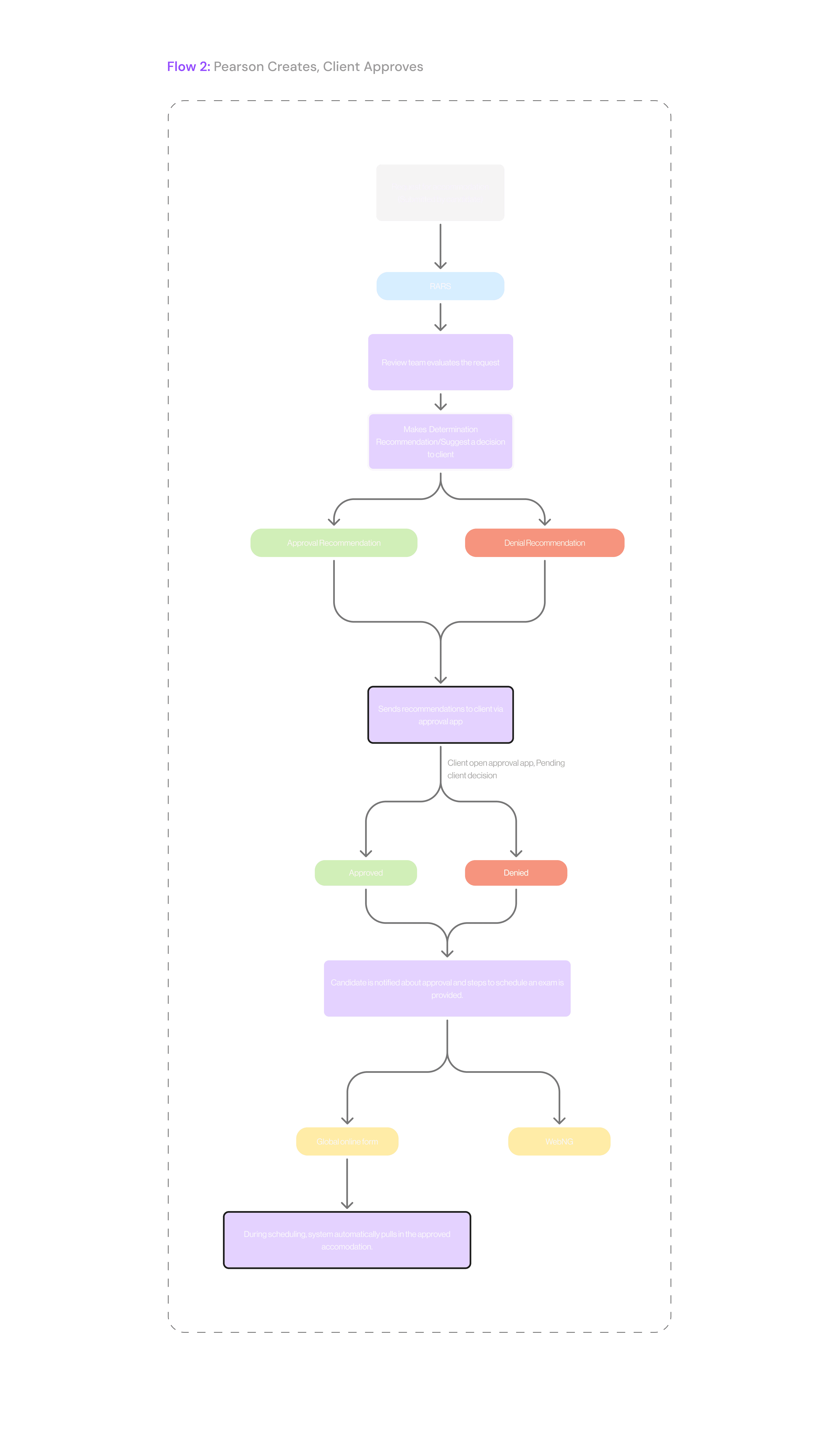
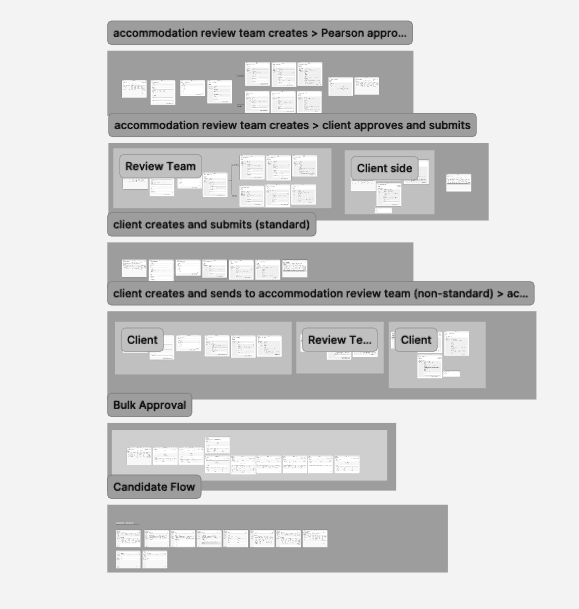
What looked like one process turned out to be four different scenarios. Depending on who created and approved the request, the flow changed. To make sense of this, I mapped four core flows:


Why Choose Icon

Pearson creates → Pearson approves

Pearson creates → Pearson approves

Why Choose Icon
Why Choose Icon

Pearson creates → Client approves

Pearson creates → Client approves

Why Choose Icon
Why Choose Icon

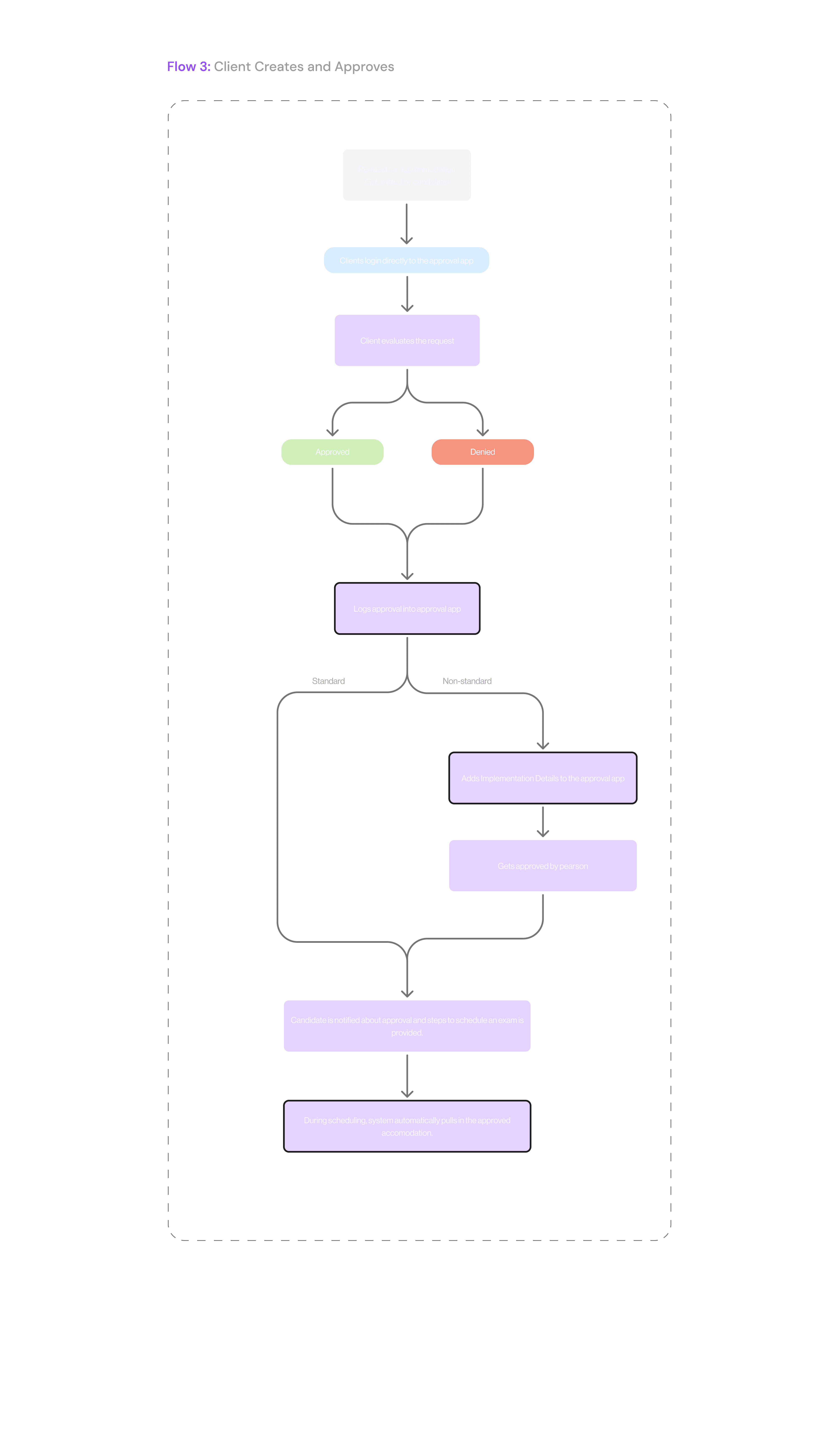
Client creates → Client approves

Client creates → Client approves

Why Choose Icon
Why Choose Icon

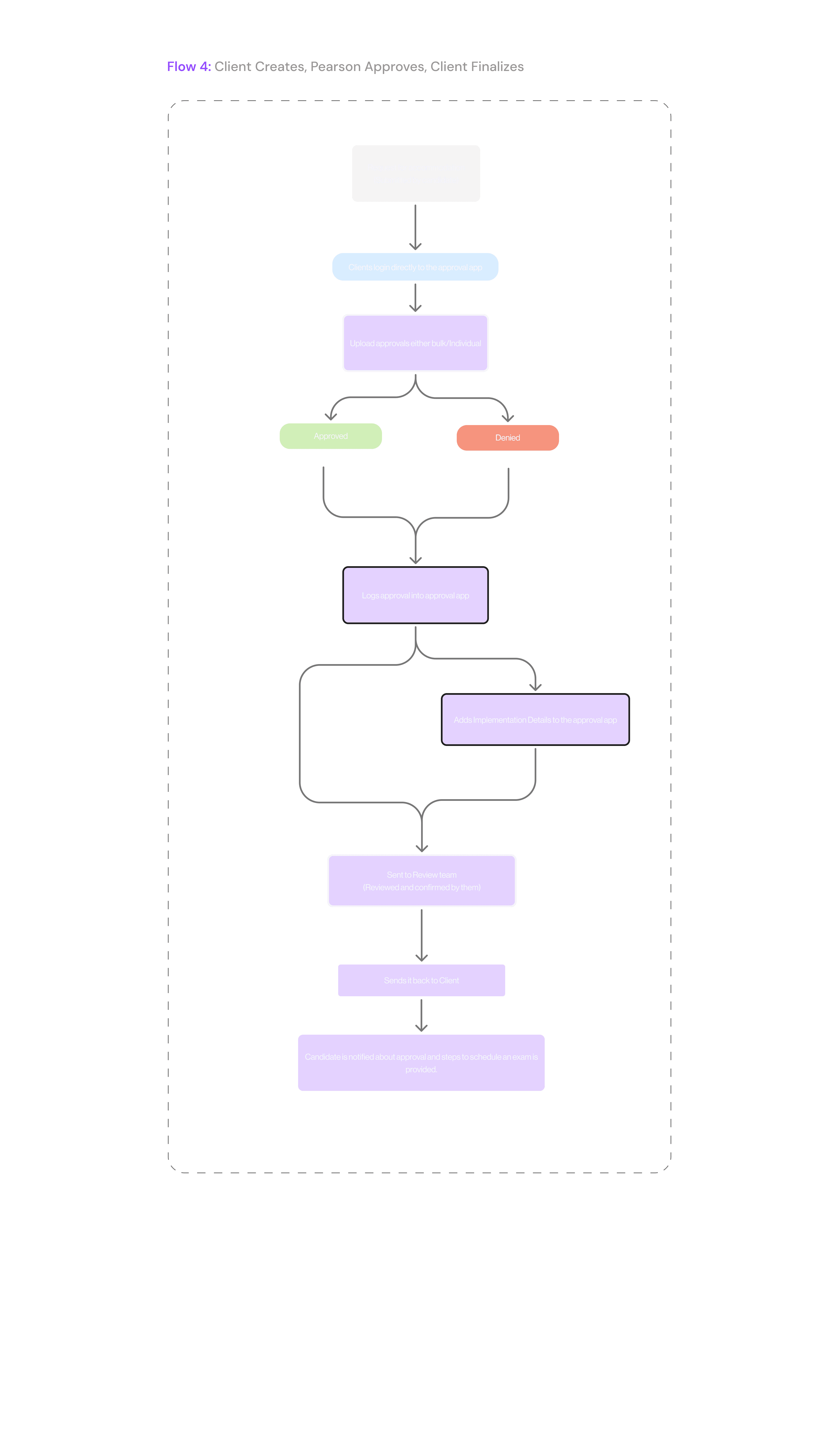
Client creates → Pearson reviews → Client finalizes

Client creates → Pearson reviews → Client finalizes

Designing for all four meant thinking in terms of states, permissions, and transitions not just screens. There are four core flows here — it might feel like a lot at first, but this is what helped simplify the system later.
Statistics Image

Designing the System

Before jumping into UI, I broke the system into two key categories:

Standard Requests

Predefined accommodations that can be approved quickly.

Non-standard Requests

More complex cases that require additional planning and multiple approvals.

This distinction shaped how the system behaves.

#6 Research & Discovery

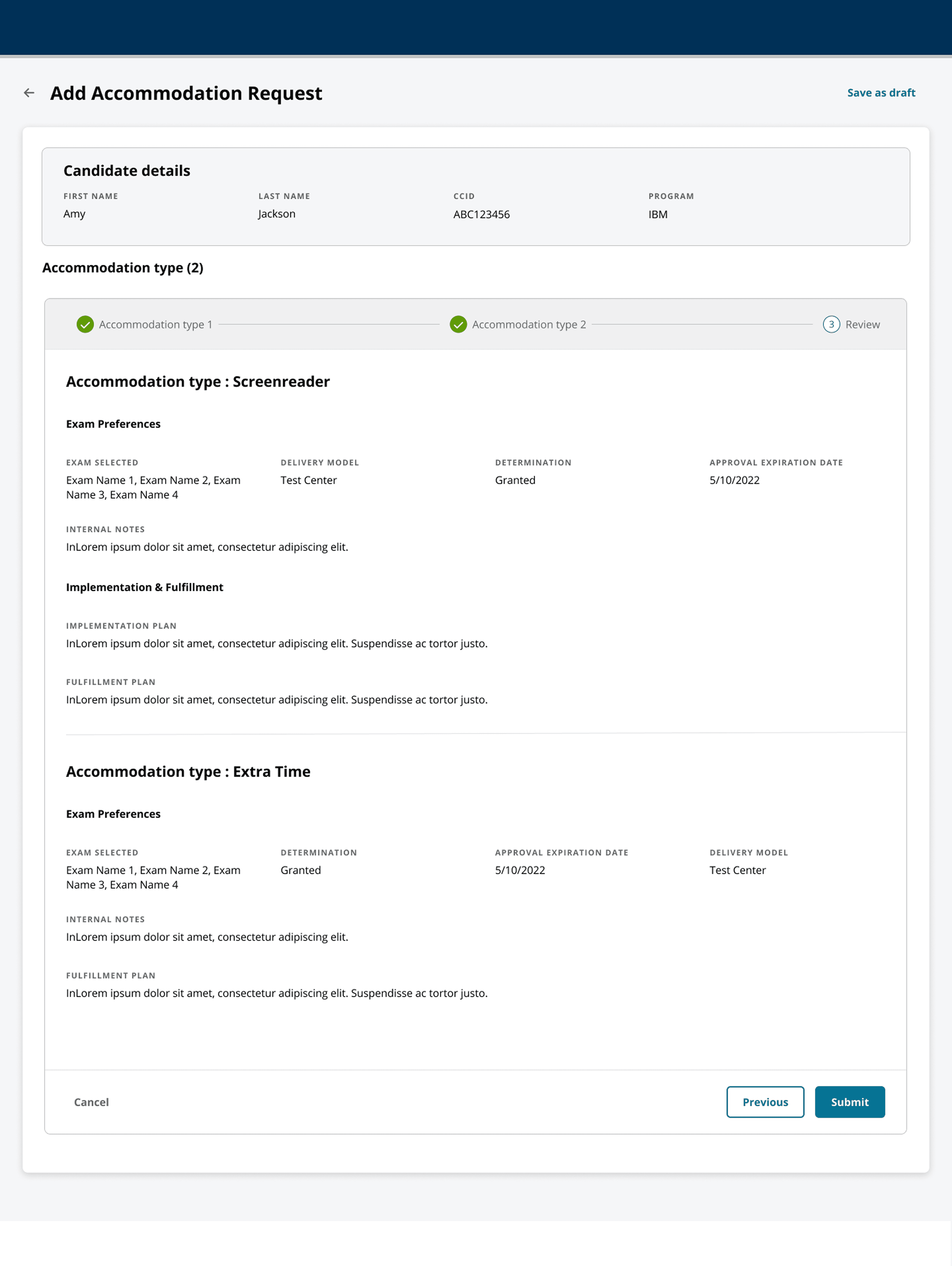
Across all scenarios, the system follows a consistent structure:
Designing for States, Not Screens

Instead of focusing on screens, I designed around how requests move.

Each request transitions through states: Pending → In Review → Approved → Completed

This made it possible to support multiple teams, maintain consistency across flows, and reduce confusion.

Round 1 — Mid-fidelity testing

#7 Usability Testing & Iteration

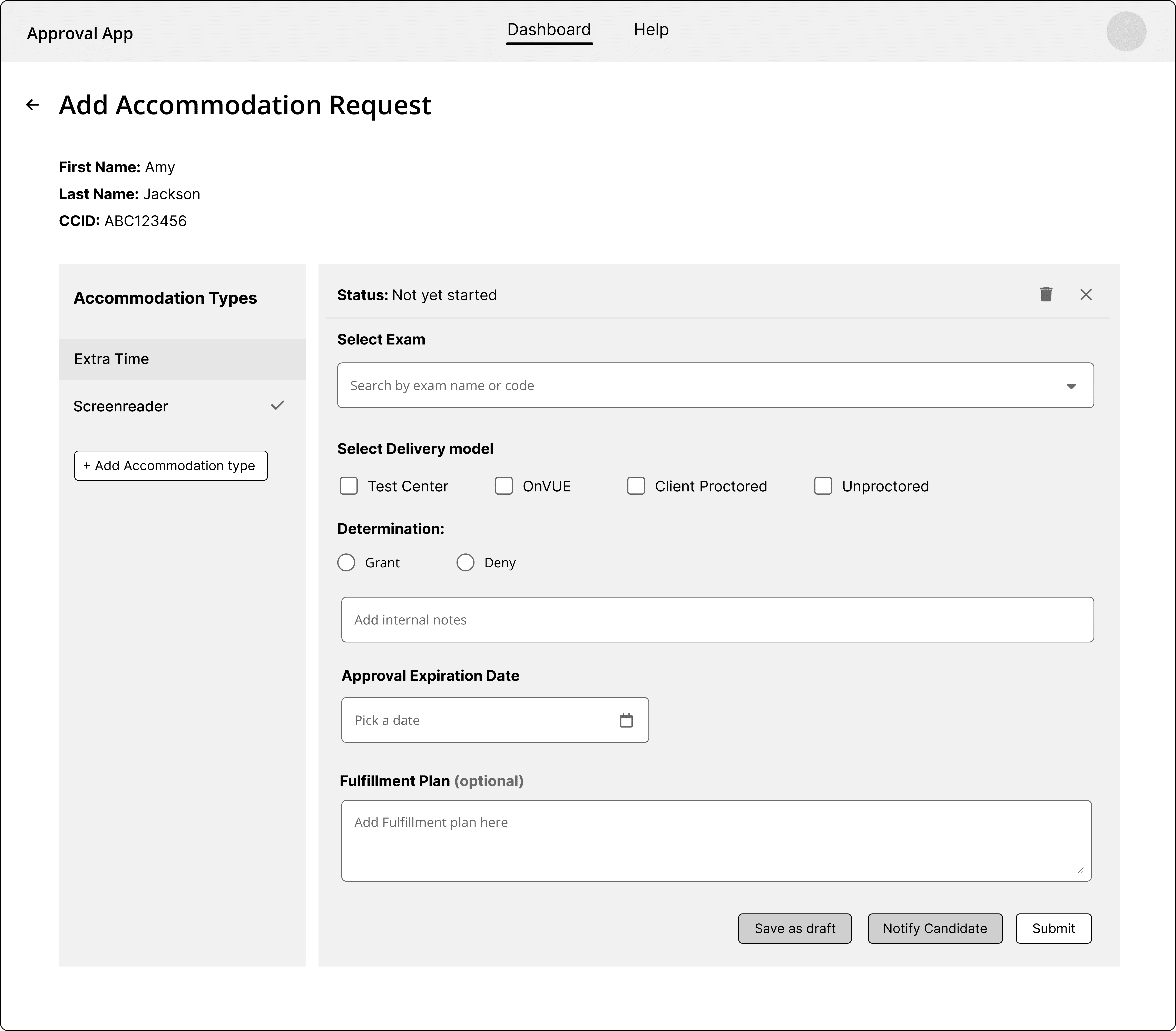
Reviewers struggled to track which accommodation types were completed, often missing pending ones or assuming everything was approved due to the lack of a clear progress indicator.
Why Choose Icon

Iteration — Introducing the Stepper

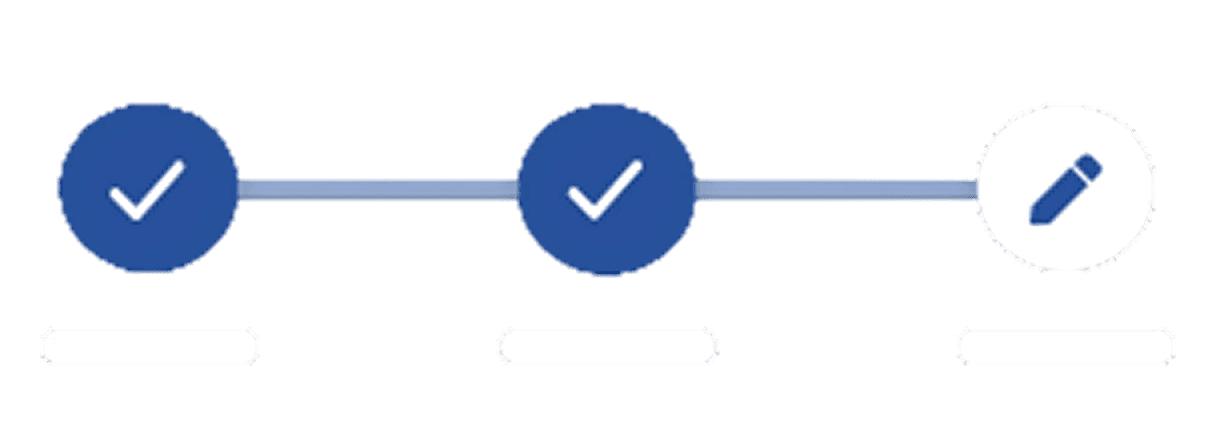
I replaced side navigation with a stepper. Each step showed what was complete and what was pending, making the process more traceable and reducing missed steps.

Round 2 — Cross-team validation

#7 Usability Testing & Iteration

We tested the updated design with review, scheduling, and client teams.

Amy | Head of Review Team

Now every action leads somewhere — nothing gets lost.

Why Choose Icon

Stronger flow understanding and execution

90% found the flow easier to understand. 8/10 completed tasks without help.

Bringing all pieces together

#8 Final Design Highlights
Service Icon

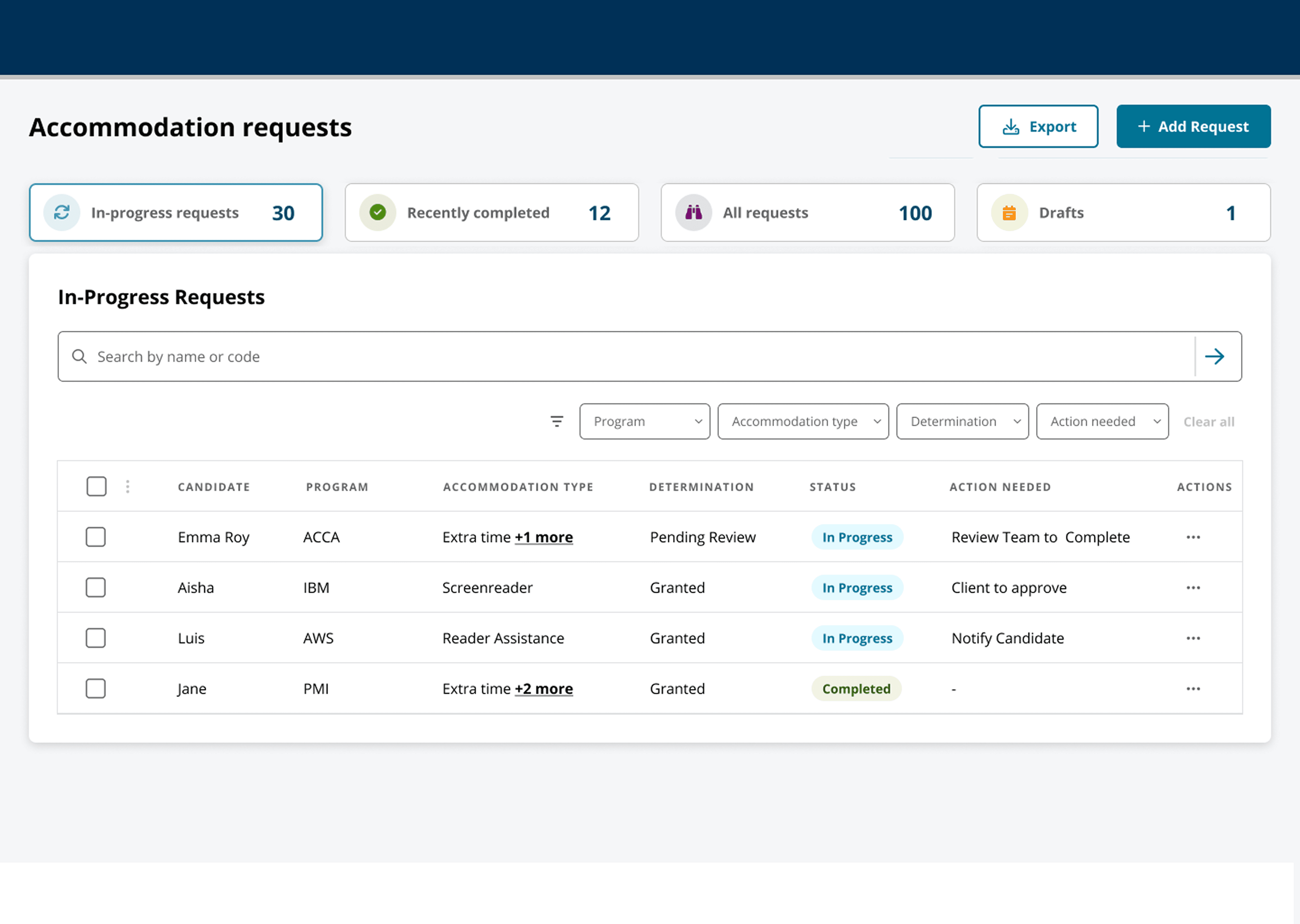
Centralized dashboard for all teams

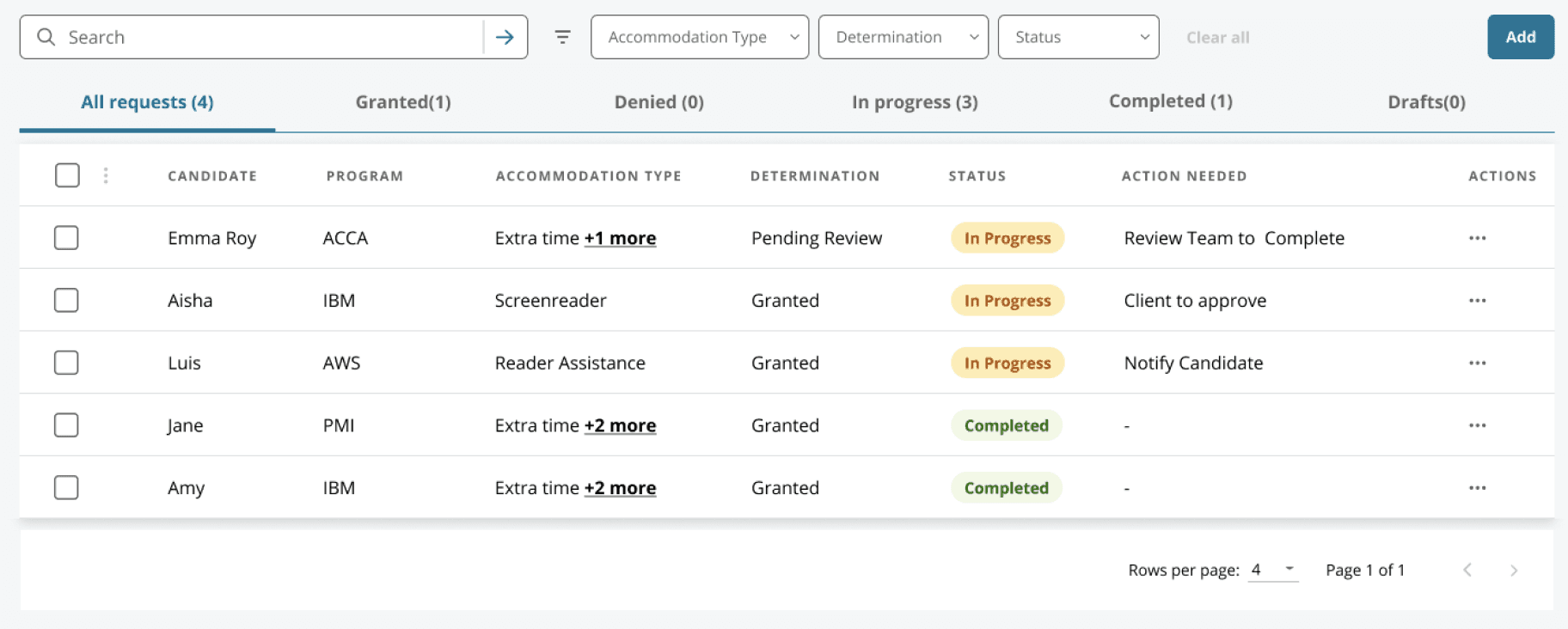
A single place to view, track, and manage requests with filters for status, program, and urgency—replacing scattered spreadsheets with real-time visibility.

Professional, conversion-optimized websites tailored for business clients and lead generation.

Real-time visibility

Business website

Single source

Corporate site

Unified tracking

Responsive design

Service Icon

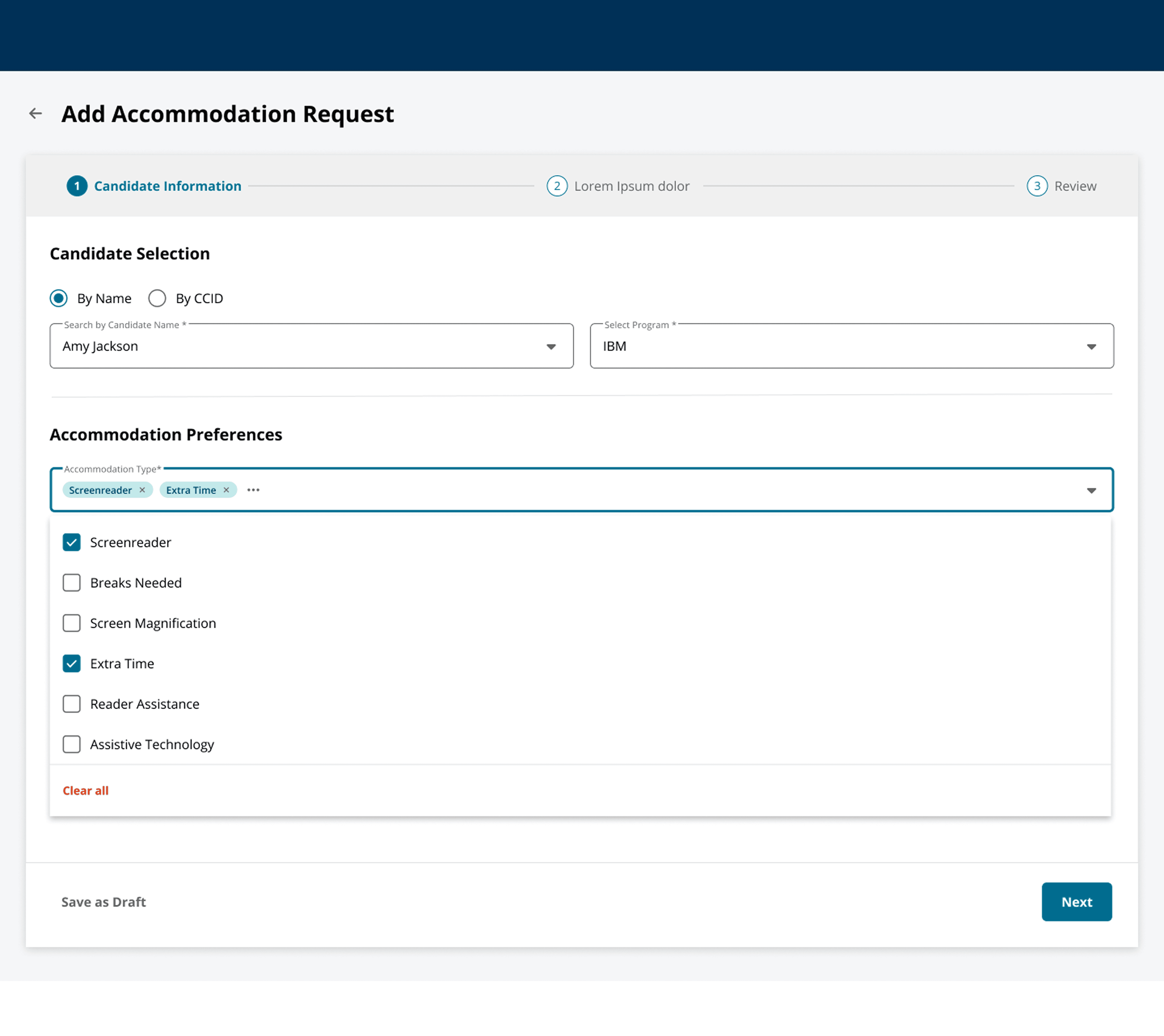
Guided request creation flow

Teams can quickly create requests by selecting candidates, adding details, and including multiple accommodation types in one place.

Professional, conversion-optimized websites tailored for business clients and lead generation.

Faster input

Business website

Structured flow

Corporate site

Multi-entry

Responsive design

Service Icon

Structured stepper for multi-accommodation handling
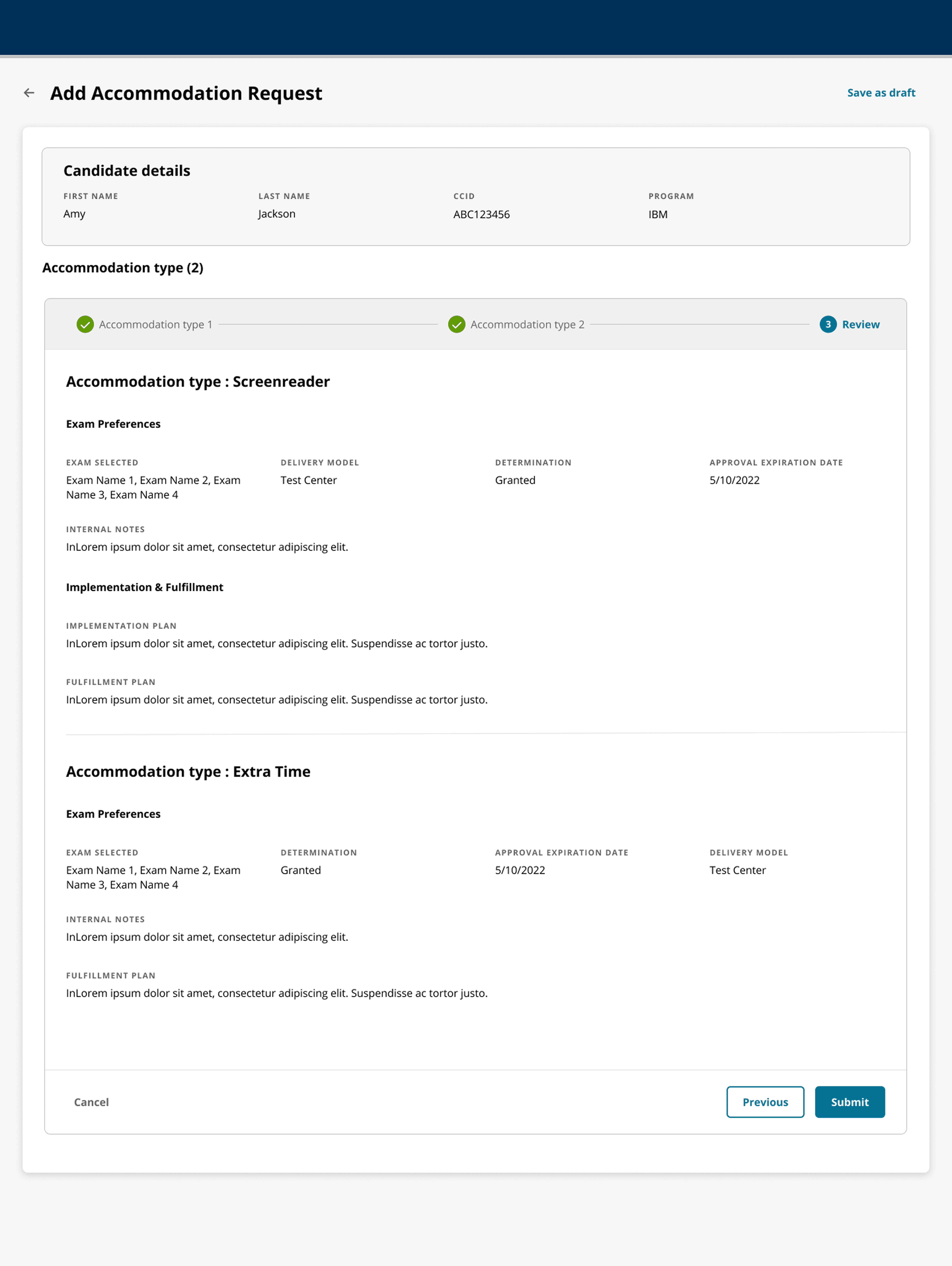
Each accommodation is treated as a step, making it easy to track progress, complete required inputs, and avoid missing anything.

Professional, conversion-optimized websites tailored for business clients and lead generation.

Progress clarity

Business website

Step tracking

Corporate site

Error reduction

Responsive design

Service Icon

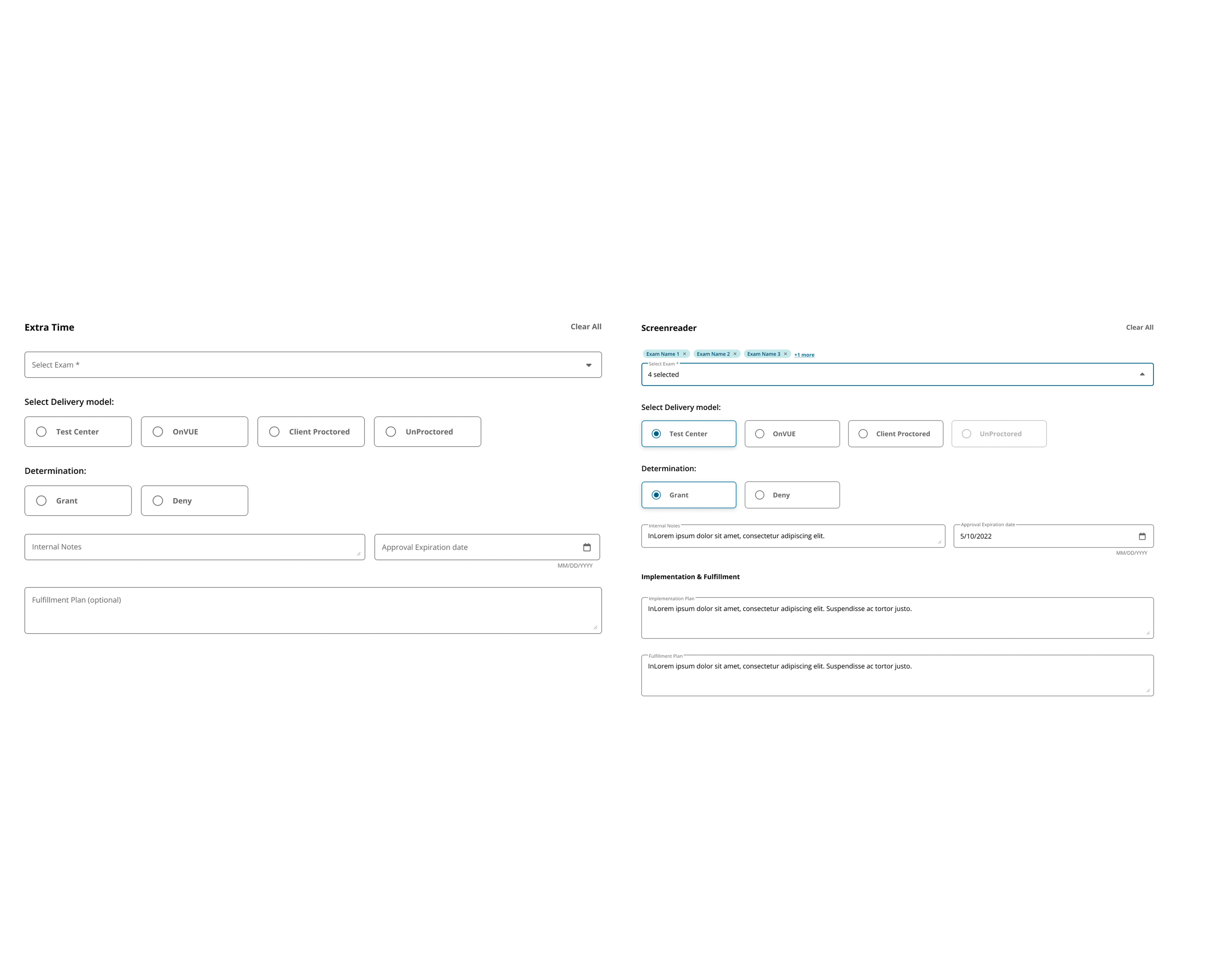
Context-aware inputs

The system adapts based on request type—standard requests stay simple, while non-standard ones reveal additional fields like implementation and fulfillment plans only when needed.

Professional, conversion-optimized websites tailored for business clients and lead generation.

Adaptive UI

Business website

Smart inputs

Corporate site

Reduced clutter

Responsive design

Service Icon

Clear determination and decision tracking
Teams can grant, deny, or recommend decisions with supporting notes, ensuring transparency across teams.

Professional, conversion-optimized websites tailored for business clients and lead generation.

Decision clarity

Business website

Transparent flow

Corporate site

Action tracking

Responsive design

Service Icon

Built-in validation at every step

Missing or incomplete fields are flagged instantly, preventing submission errors and reducing back-and-forth later.

Professional, conversion-optimized websites tailored for business clients and lead generation.

Professional, conversion-optimized websites tailored for business clients and lead generation.

Error prevention

Business website

Data accuracy

Corporate site

Instant feedback

Responsive design

Service Icon

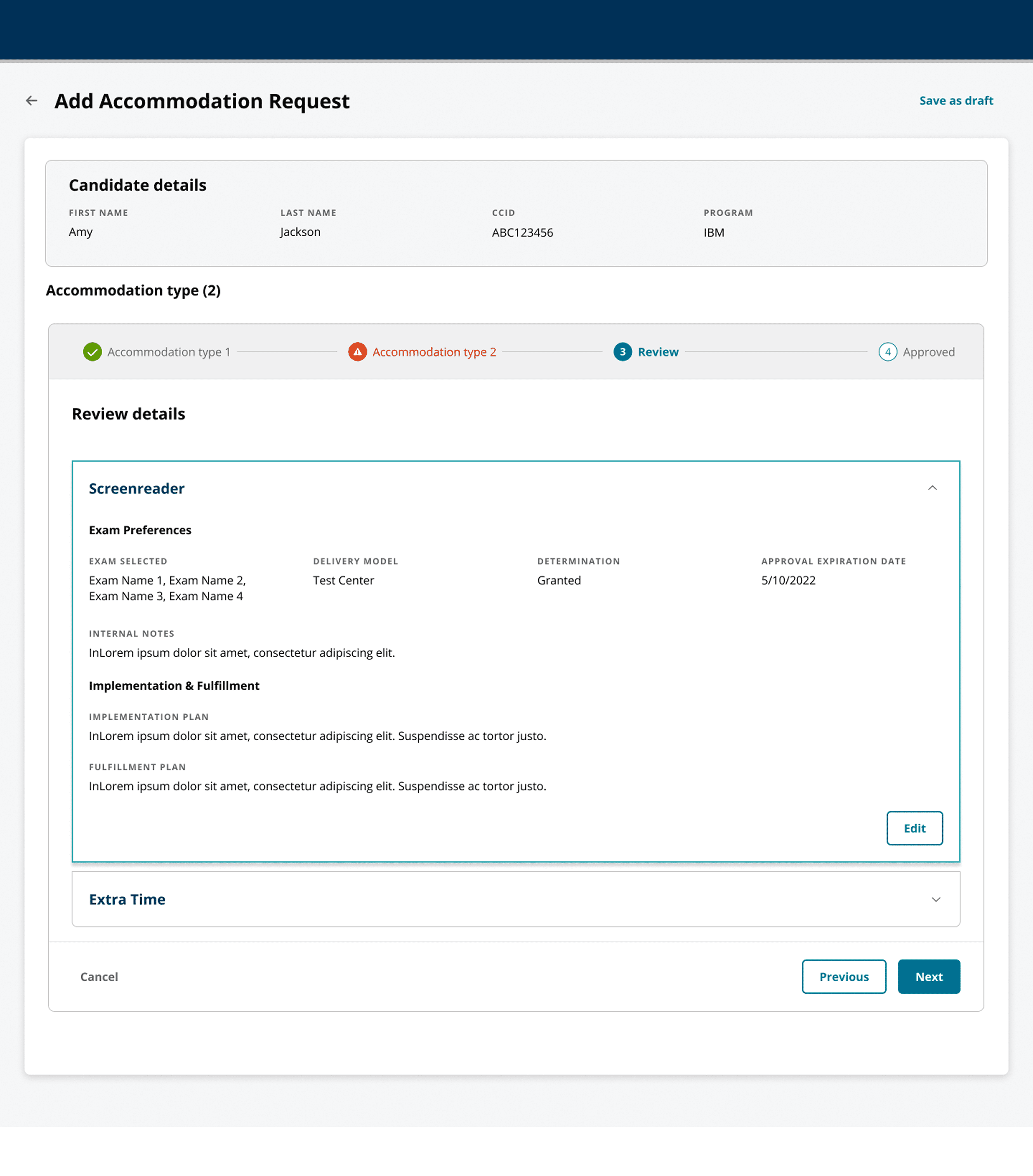
Review layer before submission

A final review page allows teams to verify all details across accommodations before submitting, improving accuracy and confidence.

Professional, conversion-optimized websites tailored for business clients and lead generation.

Professional, conversion-optimized websites tailored for business clients and lead generation.

Final check

Business website

Improved accuracy

Corporate site

Confident submission

Responsive design

Service Icon

Real-time system updates across teams

Every action reflects instantly on all dashboards, removing the need for manual follow-ups or confirmation emails.

Professional, conversion-optimized websites tailored for business clients and lead generation.

Professional, conversion-optimized websites tailored for business clients and lead generation.

Live sync

Business website

No follow-ups

Corporate site

Faster coordination

Responsive design

Service Icon

Clear determination and decision tracking

Teams can grant, deny, or recommend decisions with supporting notes, ensuring transparency across teams.

Professional, conversion-optimized websites tailored for business clients and lead generation.

Decision clarity

Business website

Transparent flow

Corporate site

Action tracking

Responsive design

CTA BG

With everything in one system, teams no longer had to wait on emails or handoffs they could act right away.

With everything in one system, teams no longer had to wait on emails or handoffs they could act right away.

+40% ✅

faster approvals

+30% 📆

quicker scheduling

−45% ⚠️

manual errors

CTA BG

With everything in one system, teams no longer had to wait on emails or handoffs they could act right away.

+40% ✅

faster approvals

+30% 📆

quicker scheduling

−45% ⚠️

manual errors

Scaling the system for efficiency

#9 Future Development

A few things we’re building next to make the system more scalable and easier to manage:

Why Choose Icon

Bulk upload will allow teams to add multiple accommodation requests at once, reducing manual effort for high-volume programs.

Bulk upload will allow teams to add multiple accommodation requests at once, reducing manual effort for high-volume programs.

Why Choose Icon

Integrating with the RARS API will automatically bring in candidate data, removing the need for manual entry.

Integrating with the RARS API will automatically bring in candidate data, removing the need for manual entry.

Why Choose Icon

Audit logs and analytics will help track decisions and performance, while a phased rollout ensures smooth adoption across programs.

Audit logs and analytics will help track decisions and performance, while a phased rollout ensures smooth adoption across programs.

Together, these improvements will elevate the Approval App from a process tool into a scalable platform that accelerates operations, reduces turnaround time, and strengthens collaboration across Pearson’s ecosystem.

By unifying complex approval paths under one adaptable flow, the Approval App sets a new benchmark for efficiency — transforming how Pearson and its partners manage accommodations with speed, consistency, and confidence.
:root { --grain-opacity: .06; } /* tweak strength */ html, body { height:100%; background:#0e4d2b; } /* your green */ body::before{ content:""; position:fixed; inset:0; pointer-events:none; z-index:999999; /* above everything, but not clickable */ opacity:var(--grain-opacity); mix-blend-mode:multiply; /* try overlay/soft-light too */ background-image: url("data:image/png;base64,iVBORw0KGgoAAAANSUhEUgAAAAgAAAAICAYAAADED76LAAAAL0lEQVQYV2NkYGD4z0AbYMQgRRCgGJgYGBhGJgZ/ABQxgQGg2kCw0EwDgYQzCwBQAQAA8n0V2b0o3jQAAAABJRU5ErkJggg=="); background-repeat:repeat; image-rendering: pixelated; /* keeps noise crisp */ }